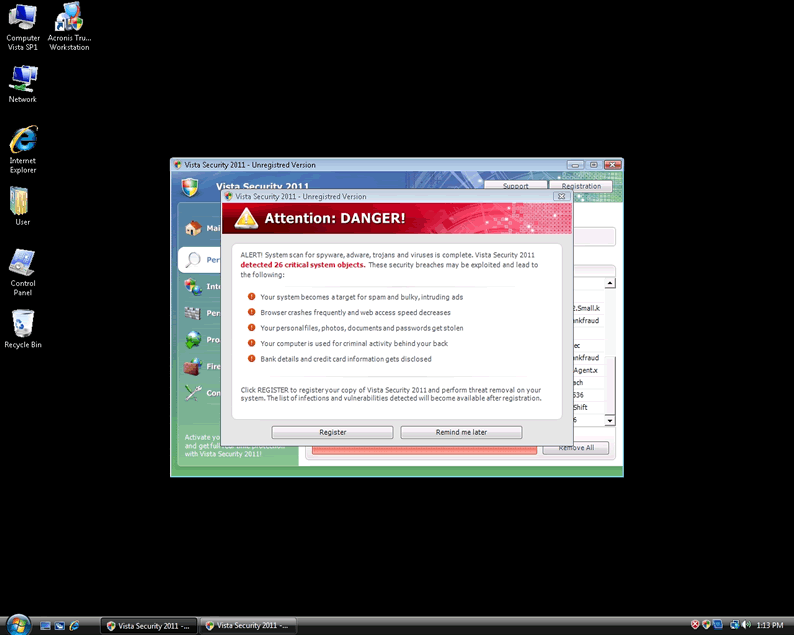
Vista Security 2011

El Vista Security 2011 es una aplicación falsa de seguridad, conocida por bloquear la instalación de programas de seguridad de buena reputación. El nombre "Vista" del Vista Security 2011 puede engañar a los usuarios informáticos en la creencia de que es una aplicación de confianza, debido a la similitud con el nombre de "Windows Vista". Los usuarios de computadoras deben darse cuenta de que Vista Security 2011 no ayuda en la detección y eliminación de malware de computadora. Vista Security 2011 fue creado por los hackers con la intención de extorsionar los usuarios de ordenador crédulos, a través del uso de tácticas agresivas como falsos mensajes emergentes de alerta y los resultados de análisis falsos de parásito de sistema.

Un usuario de computadora puede intentar eliminar manualmente VistaSecurity2011 pero ha demostrado ser difícil y arriesgado, a veces potencialmente perjudiciando a Windows por la eliminación de ciertas entradas del registro. Usted nunca deber comprar Vista Security 2011 por cualquier motivo. Cargar un ordenador en modo seguro puede eliminar la capacidad del Vista Security 2011 de bloquear la instalación de otras aplicaciones de seguridad.

Detalles del Sistema de Archivos

Vista Security 2011 puede crear los siguientes archivos:
# Nombre Detecciones
1. c:\Program Files\Vista Security 2011\VS2011.exe
2. c:\WINDOWS\system32\winlogon86.exe
3. c:\[RANDOM CHARACTERS].exe
4. c:\WINDOWS\system32\winupdate86.exe
5. %AppData%\Local\[RANDOM CHARACTERS].exe
6. Vista Security 2011.exe
7. c:\WINDOWS\system32\[RANDOM CHARACTERS].exe
8. c:\WINDOWS\system32\winhelper86.dll
9. %Temp%\t3e0ilfioi3684m2nt3ps2b6lru
10. %AllUsersProfile%\t3e0ilfioi3684m2nt3ps2b6lru
11. %AppData%\Roaming\Microsoft\Windows\Templates\t3e0ilfioi3684m2nt3ps2b6lru
12. c:\Program Files\Vista Security 2011
13. %AppData%\Local\t3e0ilfioi3684m2nt3ps2b6lru

Detalles del Registro

Vista Security 2011 puede crear la siguiente entrada o entradas de registro:
HKEY_LOCAL_MACHINE\SOFTWARE\Microsoft\Windows\CurrentVersion\Uninstall\Vista Security 2011
HKEY_LOCAL_MACHINE\SOFTWARE\Microsoft\Windows\CurrentVersion\Run "winupdate86.exe"
HKEY_CURRENT_USER\Software\Classes\.exe\shell\open\command "IsolatedCommand" = '"%1" %*'
HKEY_CURRENT_USER\Software\Classes\exefile "(Default)" = 'Application'
HKEY_CURRENT_USER\Software\Classes\exefile\DefaultIcon "(Default)" = '%1'
HKEY_CURRENT_USER\Software\Classes\exefile\shell\open\command "IsolatedCommand" = '"%1" %*'
HKEY_CLASSES_ROOT\.exe\shell\open\command "(Default)" = '"%UserProfile%\Local Settings\Application Data\[RANDOM 3 LETTERS].exe" /START "%1" %*'
HKEY_CLASSES_ROOT\.exe\shell\runas\command "IsolatedCommand" = '"%1" %*'
HKEY_CLASSES_ROOT\exefile\shell\open\command "IsolatedCommand" = '"%1" %*'
HKEY_LOCAL_MACHINE\SOFTWARE\Clients\StartMenuInternet\FIREFOX.EXE\shell\open\command "(Default)" = '"%UserProfile%\Local Settings\Application Data\[RANDOM 3 LETTERS].exe" /START "C:\Program Files\Mozilla Firefox\firefox.exe"'
HKEY_CURRENT_USER\Software\Vista Security 2011
HKEY_CURRENT_USER\Software\VS2011
HKEY_CURRENT_USER\Software\Classes\.exe "(Default)" = 'exefile'
HKEY_CURRENT_USER\Software\Classes\.exe\shell\runas\command "IsolatedCommand" = '"%1" %*'
HKEY_CURRENT_USER\Software\Classes\exefile "Content Type" = 'application/x-msdownload'
HKEY_CURRENT_USER\Software\Classes\exefile\shell\runas\command "(Default)" = '"%1" %*'
HKEY_CLASSES_ROOT\.exe\DefaultIcon "(Default)" = '%1'
HKEY_CLASSES_ROOT\.exe\shell\open\command "IsolatedCommand" = '"%1" %*'
HKEY_CLASSES_ROOT\exefile\shell\runas\command "IsolatedCommand" = '"%1" %*'
HKEY_LOCAL_MACHINE\SOFTWARE\Clients\StartMenuInternet\IEXPLORE.EXE\shell\open\command "(Default)" = '"%UserProfile%\Local Settings\Application Data\[RANDOM 3 LETTERS].exe" /START "C:\Program Files\Internet Explorer\iexplore.exe"'
HKEY_CURRENT_USER\Software\Microsoft\Windows\CurrentVersion\Run "Vista Security 2011"
HKEY_LOCAL_MACHINE\SOFTWARE\Vista Security 2011
HKEY_CURRENT_USER\Software\Classes\.exe "Content Type" = 'application/x-msdownload'
HKEY_CURRENT_USER\Software\Classes\.exe\shell\runas\command "(Default)" = '"%1" %*'
HKEY_CURRENT_USER\Software\Classes\.exe\DefaultIcon "(Default)" = '%1' = '"%UserProfile%\Local Settings\Application Data\[RANDOM 3 LETTERS].exe" /START "%1" %*'
HKEY_CURRENT_USER\Software\Classes\exefile\shell\open\command "(Default)" = '"%UserProfile%\Local Settings\Application Data\[RANDOM 3 LETTERS].exe" /START "%1" %*'
HKEY_CURRENT_USER\Software\Classes\exefile\shell\runas\command "IsolatedCommand" - '"%1" %*'
HKEY_CLASSES_ROOT\.exe\shell\runas\command "(Default)" = '"%1" %*'
HKEY_CLASSES_ROOT\exefile "Content Type" = 'application/x-msdownload'
HKEY_CLASSES_ROOT\exefile\shell\open\command "(Default)" = '"%UserProfile%\Local Settings\Application Data\[RANDOM 3 LETTERS].exe" /START "%1" %*'
HKEY_LOCAL_MACHINE\SOFTWARE\Clients\StartMenuInternet\FIREFOX.EXE\shell\safemode\command "(Default)" = '"%UserProfile%\Local Settings\Application Data\[RANDOM 3 LETTERS].exe" /START "C:\Program Files\Mozilla Firefox\firefox.exe" -safe-mode'

Tendencias

Mas Visto

Cargando...

